Friday, September 11, 2020

Fundamentals of Computer Science

Control Structures in Program


Control Structures are just a way to specify flow of control in programs. Any algorithm or program can be more clear and understood if they use self-contained modules called as logic or control structures. It basically analyzes and chooses in which direction a program flows based on certain parameters or conditions. There are three basic types of logic, or flow of control, known as:

  1. Sequence logic, or sequential flow
  2. Selection logic, or conditional flow
  3. Iteration logic, or repetitive flow

Let us see them in detail:

  1. Sequential Logic (Sequential Flow)

    Sequential logic as the name suggests follows a serial or sequential flow in which the flow depends on the series of instructions given to the computer. Unless new instructions are given, the modules are executed in the obvious sequence. The sequences may be given, by means of numbered steps explicitly. Also, implicitly follows the order in which modules are written. Most of the processing, even some complex problems, will generally follow this elementary flow pattern.
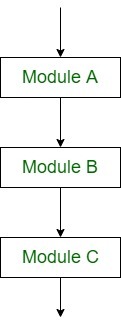
    Sequential Control flow

  2. Selection Logic (Conditional Flow)

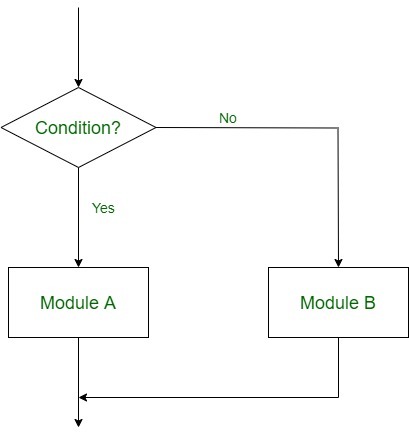
    Selection Logic simply involves a number of conditions or parameters which decides one out of several written modules. The structures which use these type of logic are known as Conditional Structures. These structures can be of three types:

    • Single AlternativeThis structure has the form:
      If (condition) then:
           [Module A]   
      [End of If structure]
       
      Multiple AlternativesThis structure has the form:
      If (condition A), then:
           [Module A]
      Else if (condition B), then:
           [Module B]
              ..
              ..
      Else if (condition N), then:
           [Module N]
      [End If structure] 
       

      In this way, the flow of the program depends on the set of conditions that are written. This can be more understood by the following flow charts:

      Double Alternative Control Flow

      Iteration Logic (Repetitive Flow)
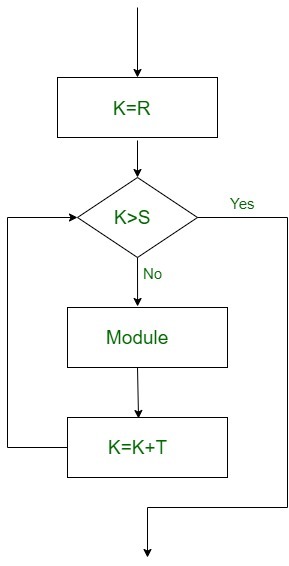
      The Iteration logic employs a loop which involves a repeat statement followed by a module known as the body of a loop.
      The two types of these structures are: Repeat-For Structure
      This structure has the form: Repeat for i = A to N by I: [Module] [End of loop]

      Here, A is the initial value, N is the end value and I is the increment. The loop ends when A>B. K increases or decreases according to the positive and negative value of I respectively.


computer

computer is an electronic device that manipulates information, or data. It has the ability to storeretrieve, and process data. You may already know that you can use a computer to type documentssend emailplay games, and browse the Web. You can also use it to edit or create spreadsheetspresentations, and even videos.


Following are some of the important input devices which are used in a computer −

  • Keyboard
  • Mouse
  • Joy Stick
  • Light pen
  • Track Ball
  • Scanner
  • Graphic Tablet
  • Microphone
  • Magnetic Ink Card Reader(MICR)
  • Optical Character Reader(OCR)
  • Bar Code Reader
  • Optical Mark Reader(OMR)

Keyboard

Keyboard is the most common and very popular input device which helps to input data to the computer. The layout of the keyboard is like that of traditional typewriter, although there are some additional keys provided for performing additional functions.
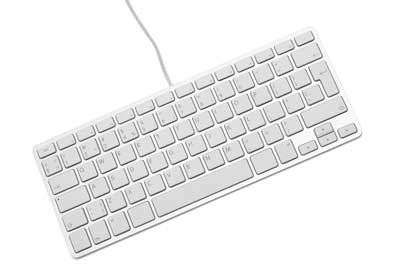
Keyboard

Keyboards are of two sizes 84 keys or 101/102 keys, but now keyboards with 104 keys or 108 keys are also available for Windows and Internet.

The keys on the keyboard are as follows −

S.NoKeys & Description
1

Typing Keys

These keys include the letter keys (A-Z) and digit keys (09) which generally give the same layout as that of typewriters.

2

Numeric Keypad

It is used to enter the numeric data or cursor movement. Generally, it consists of a set of 17 keys that are laid out in the same configuration used by most adding machines and calculators.

3

Function Keys

The twelve function keys are present on the keyboard which are arranged in a row at the top of the keyboard. Each function key has a unique meaning and is used for some specific purpose.

4

Control keys

These keys provide cursor and screen control. It includes four directional arrow keys. Control keys also include Home, End, Insert, Delete, Page Up, Page Down, Control(Ctrl), Alternate(Alt), Escape(Esc).

5

Special Purpose Keys

Keyboard also contains some special purpose keys such as Enter, Shift, Caps Lock, Num Lock, Space bar, Tab, and Print Screen.

Mouse

Mouse is the most popular pointing device. It is a very famous cursor-control device having a small palm size box with a round ball at its base, which senses the movement of the mouse and sends corresponding signals to the CPU when the mouse buttons are pressed.

Generally, it has two buttons called the left and the right button and a wheel is present between the buttons. A mouse can be used to control the position of the cursor on the screen, but it cannot be used to enter text into the computer.

Mouse

Advantages

  • Easy to use
  • Not very expensive
  • Moves the cursor faster than the arrow keys of the keyboard.

Joystick

Joystick is also a pointing device, which is used to move the cursor position on a monitor screen. It is a stick having a spherical ball at its both lower and upper ends. The lower spherical ball moves in a socket. The joystick can be moved in all four directions.
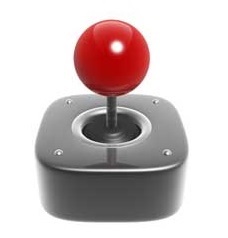
Joystick

The function of the joystick is similar to that of a mouse. It is mainly used in Computer Aided Designing (CAD) and playing computer games.

Light Pen

Light pen is a pointing device similar to a pen. It is used to select a displayed menu item or draw pictures on the monitor screen. It consists of a photocell and an optical system placed in a small tube.

Light Pen

When the tip of a light pen is moved over the monitor screen and the pen button is pressed, its photocell sensing element detects the screen location and sends the corresponding signal to the CPU.

Track Ball

Track ball is an input device that is mostly used in notebook or laptop computer, instead of a mouse. This is a ball which is half inserted and by moving fingers on the ball, the pointer can be moved.

Track Ball

Since the whole device is not moved, a track ball requires less space than a mouse. A track ball comes in various shapes like a ball, a button, or a square.

Scanner

Scanner is an input device, which works more like a photocopy machine. It is used when some information is available on paper and it is to be transferred to the hard disk of the computer for further manipulation.
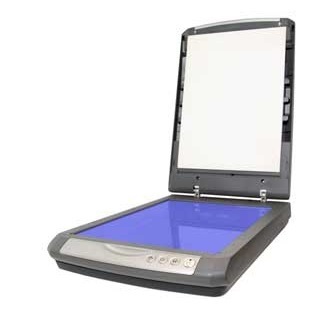
Scanner

Scanner captures images from the source which are then converted into a digital form that can be stored on the disk. These images can be edited before they are printed.

Digitizer

Digitizer is an input device which converts analog information into digital form. Digitizer can convert a signal from the television or camera into a series of numbers that could be stored in a computer. They can be used by the computer to create a picture of whatever the camera had been pointed at.
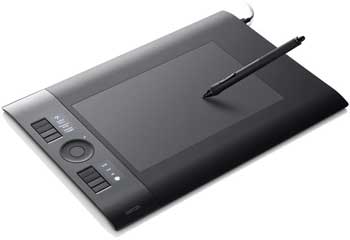
Graphic Tablet

Digitizer is also known as Tablet or Graphics Tablet as it converts graphics and pictorial data into binary inputs. A graphic tablet as digitizer is used for fine works of drawing and image manipulation applications.

Microphone

Microphone is an input device to input sound that is then stored in a digital form.

Microphone

The microphone is used for various applications such as adding sound to a multimedia presentation or for mixing music.

Magnetic Ink Card Reader (MICR)

MICR input device is generally used in banks as there are large number of cheques to be processed every day. The bank's code number and cheque number are printed on the cheques with a special type of ink that contains particles of magnetic material that are machine readable.
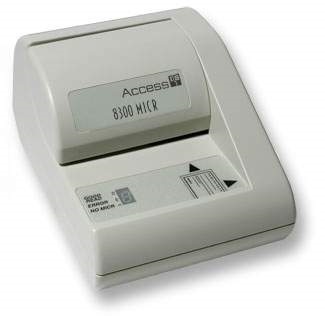
Magnetic Ink Card Reader(MICR)

This reading process is called Magnetic Ink Character Recognition (MICR). The main advantages of MICR is that it is fast and less error prone.

Optical Character Reader (OCR)

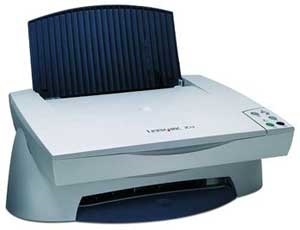
OCR is an input device used to read a printed text.
Optical Character Reader(OCR)

OCR scans the text optically, character by character, converts them into a machine readable code, and stores the text on the system memory.

Bar Code Readers

Bar Code Reader is a device used for reading bar coded data (data in the form of light and dark lines). Bar coded data is generally used in labelling goods, numbering the books, etc. It may be a handheld scanner or may be embedded in a stationary scanner.

Barcode Reader

Bar Code Reader scans a bar code image, converts it into an alphanumeric value, which is then fed to the computer that the bar code reader is connected to.

Optical Mark Reader (OMR)

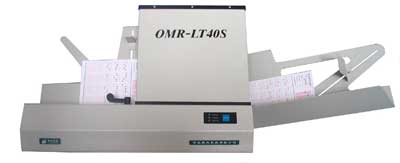
OMR is a special type of optical scanner used to recognize the type of mark made by pen or pencil. It is used where one out of a few alternatives is to be selected and marked.
Optical Mark Reader(OMR)

It is specially used for checking the answer sheets of examinations having multiple choice questions


Output Devices:

 some of the important output devices used in a computer.

  • Monitors
  • Graphic Plotter
  • Printer

Monitors

Monitors, commonly called as Visual Display Unit (VDU), are the main output device of a computer. It forms images from tiny dots, called pixels that are arranged in a rectangular form. The sharpness of the image depends upon the number of pixels.

There are two kinds of viewing screen used for monitors.

  • Cathode-Ray Tube (CRT)
  • Flat-Panel Display

Cathode-Ray Tube (CRT) Monitor

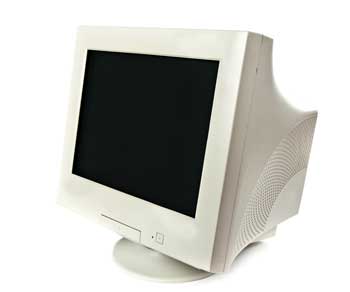
The CRT display is made up of small picture elements called pixels. The smaller the pixels, the better the image clarity or resolution. It takes more than one illuminated pixel to form a whole character, such as the letter ‘e’ in the word help.
CRT Monitor

A finite number of characters can be displayed on a screen at once. The screen can be divided into a series of character boxes - fixed location on the screen where a standard character can be placed. Most screens are capable of displaying 80 characters of data horizontally and 25 lines vertically.

There are some disadvantages of CRT −

  • Large in Size
  • High power consumption

Flat-Panel Display Monitor

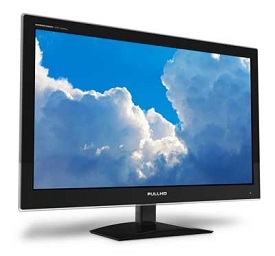
The flat-panel display refers to a class of video devices that have reduced volume, weight and power requirement in comparison to the CRT. You can hang them on walls or wear them on your wrists. Current uses of flat-panel displays include calculators, video games, monitors, laptop computer, and graphics display.
Flat Monitor

The flat-panel display is divided into two categories −

  • Emissive Displays − Emissive displays are devices that convert electrical energy into light. For example, plasma panel and LED (Light-Emitting Diodes).

  • Non-Emissive Displays − Non-emissive displays use optical effects to convert sunlight or light from some other source into graphics patterns. For example, LCD (Liquid-Crystal Device).

Printers

Printer is an output device, which is used to print information on paper.

There are two types of printers −

  • Impact Printers
  • Non-Impact Printers

Impact Printers

Impact printers print the characters by striking them on the ribbon, which is then pressed on the paper.

Characteristics of Impact Printers are the following −

  • Very low consumable costs
  • Very noisy
  • Useful for bulk printing due to low cost
  • There is physical contact with the paper to produce an image

These printers are of two types −

  • Character printers
  • Line printers

Character Printers

Character printers are the printers which print one character at a time.

These are further divided into two types:

  • Dot Matrix Printer(DMP)
  • Daisy Wheel

Dot Matrix Printer

In the market, one of the most popular printers is Dot Matrix Printer. These printers are popular because of their ease of printing and economical price. Each character printed is in the form of pattern of dots and head consists of a Matrix of Pins of size (5*7, 7*9, 9*7 or 9*9) which come out to form a character which is why it is called Dot Matrix Printer.
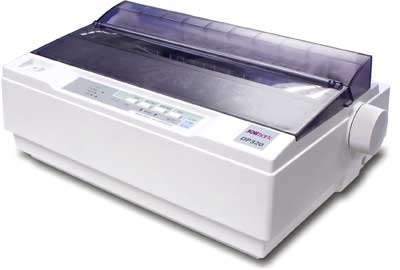
Dot Matrix Printer

Advantages

  • Inexpensive
  • Widely Used
  • Other language characters can be printed

Disadvantages

  • Slow Speed
  • Poor Quality

Daisy Wheel

Head is lying on a wheel and pins corresponding to characters are like petals of Daisy (flower) which is why it is called Daisy Wheel Printer. These printers are generally used for word-processing in offices that require a few letters to be sent here and there with very nice quality.
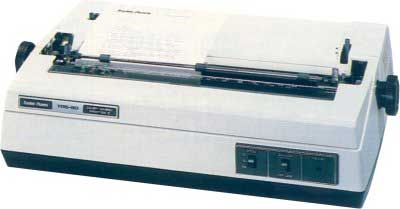
Daisy Wheel Printer

Advantages

  • More reliable than DMP
  • Better quality
  • Fonts of character can be easily changed

Disadvantages

  • Slower than DMP
  • Noisy
  • More expensive than DMP

Line Printers

Line printers are the printers which print one line at a time.
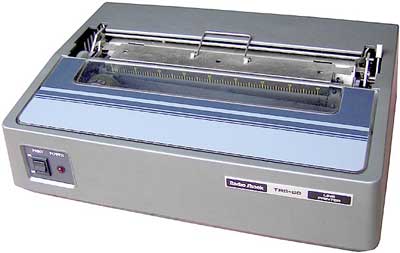
Line Printer

These are of two types −

  • Drum Printer
  • Chain Printer

Drum Printer

This printer is like a drum in shape hence it is called drum printer. The surface of the drum is divided into a number of tracks. Total tracks are equal to the size of the paper, i.e. for a paper width of 132 characters, drum will have 132 tracks. A character set is embossed on the track. Different character sets available in the market are 48 character set, 64 and 96 characters set. One rotation of drum prints one line. Drum printers are fast in speed and can print 300 to 2000 lines per minute.

Advantages

  • Very high speed

Disadvantages

  • Very expensive
  • Characters fonts cannot be changed

Chain Printer

In this printer, a chain of character sets is used, hence it is called Chain Printer. A standard character set may have 48, 64, or 96 characters.

Advantages

  • Character fonts can easily be changed.
  • Different languages can be used with the same printer.

Disadvantages

  • Noisy

Non-impact Printers

Non-impact printers print the characters without using the ribbon. These printers print a complete page at a time, thus they are also called as Page Printers.

These printers are of two types −

  • Laser Printers
  • Inkjet Printers

Characteristics of Non-impact Printers

  • Faster than impact printers
  • They are not noisy
  • High quality
  • Supports many fonts and different character size

Laser Printers

These are non-impact page printers. They use laser lights to produce the dots needed to form the characters to be printed on a page.
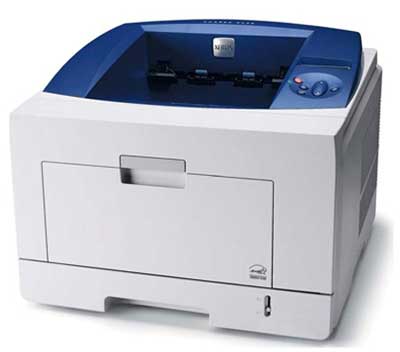
Laser Printer

Advantages

  • Very high speed
  • Very high quality output
  • Good graphics quality
  • Supports many fonts and different character size

Disadvantages

  • Expensive
  • Cannot be used to produce multiple copies of a document in a single printing

Inkjet Printers

Inkjet printers are non-impact character printers based on a relatively new technology. They print characters by spraying small drops of ink onto paper. Inkjet printers produce high quality output with presentable features.
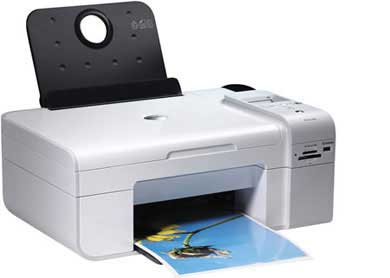
Inkjet Printer

They make less noise because no hammering is done and these have many styles of printing modes available. Color printing is also possible. Some models of Inkjet printers can produce multiple copies of printing also.

Advantages

  • High quality printing
  • More reliable

Disadvantages

  • Expensive as the cost per page is high
  • Slow as compared to laser printer


Saturday, September 7, 2019

Published Papers


List of papers Published in Journals


Ø R. Prabahari, M. Ramalingam, ”An Eminent Way Of An Improving A Denclue Algorithm Approach For Outlier Mining In Large Database”, International Journal of Computer Sciences and Engineering ,Vol.6(10), Oct 2018, ISSN: 2347-2693.

Ø M. Ramalingam, P. Prabhusundhar, R.Prabhahari, V.Azhaharasan, K. Yuvaraj, “Classifications of Biometric Security Authentication and Cluster Based Intrusion Detection, Prevention Technique in Mobile Ad-hoc Network”, ISSN 2319 – 1953International Journal of Scientific Research in Computer Science Applications and Management Studies,Volume 7, Issue 4 (July 2018).

Ø R. NagarajM. RamalingamK. Sathishkumar, “Contextual Clustering Algorithm and Sentence Clustering Based Fuzzy Relational Hierarchical Clustering for Document Clustering”, ISSN 2319 – 1953 International Journal of Scientific Research in Computer Science Applications and Management Studies IJSRCSAMS Volume 7, Issue 3 (May 2018).

Ø M. RamalingamK. Sathishkumar, K. Yuvaraj, V. Azhaharasan, R. Prabahari, “Classifications of Mobile Ad Hoc Network Security Attacks and Detection Mechanism against the Attacks in MANET”, ISSN 2319 – 1953 International Journal of Scientific Research in Computer Science Applications and Management Studies, Volume 7, Issue 3 (May 2018).

Ø P. Prabhusundhar, B. Srinivasan, M. Ramalingam, “Detection Mechanism against the Attacks in MANET and Biometric Classification”, International Journal of Computer Sciences and Engineering Vol.6(5), May 2018, E-ISSN: 2347-2693

Ø P. Prabhusundhar, B. Srinivasan, M. Ramalingam, “Stretch and Shrink Method for Security in MANET Using Biometric and Intrusion Detection System”, 2018 IJSRSET, Volume 4, Issue 4, Print ISSN: 2395-1990, Online ISSN: 2394-4099 Themed Section: Engineering and Technology 

Ø K. Sathishkumar, Dr.V. Thiagarasu, Dr.E. Balamurugan, Dr.M. Ramalingam, “Gene Selection for Cancer Classification on Microarray Gene Expression Data”, Jour of Adv Research in Dynamical & Control Systems, Vol. 10, 05-Special Issue, 2018, Elsevier, Scopus SJR.

Ø Dr. Ramalingam M., Dr. Prabhusundhar P, Dr. Thiagarasu V, Biometric Based Intrusion Detection System using Dempster-Shafer Theory for Mobile Ad hoc Network Security”, International Journal on Recent and Innovation Trends in Computing and Communication ISSN: 2321-8169 Volume: 5 Issue: 7, P.No: 384 – 391, June-2017.

Ø M. Ramalingam, Dr. V Thiagarasu, Routing and Broadcasting in MANET: A comprehensive Analysis based on, Routing technique, Clustering and Architectural Model”, International Journal of Engineering Sciences & Research Technology, ISSN: 2277-9655, IJESRT 3 (11), November 2014.
Ø Ramalingam M and Dr. Thiagarasu V., [2014], “Cluster Based Stretch and Shrink Method for Manet Using Load Balancing, Nearest Neighbor and Rule Mining”, International Journal of Engineering Sciences & Research Technology, 3(10.): October, 2014, ISSN: 2277-9655.
Ø Ramalingam M and Dr. Thiagarasu V., [2014], Identified the Cluster Based Stretch and Shrink Method Based on Load Balancing Algorithm for Ad Hoc Network Topology Stability”, International Journal on Recent and Innovation Trends in Computing and Communication ISSN: 2321-8169Volume: 2 Issue: 9 p.no: 2631 – 2635

Ø S. Janarthanam, M.Ramalingam, P. NarendranTexture analysis on low resolution images using unsupervised segmentation algorithm with multichannel Local Frequency analysis  IEEE Xplore:24 March 2011, Date Added to IEEE Xplore24 March 2011, Electronic ISBN: 978-81-8371-369-6Print on Demand(PoD) ISBN: 978-1-4577-0376-8, INSPEC Accession Number: 11887432, Publisher: IEEE.

Ø K Sathishkumar, Dr.V Thiagarasu, M. Ramalingam, Survey On Biclustering And Its Applications”, International Journal of Computer Science and Business Informatics 12 (1), ISSN-1694-2108, 2014

Ø K. Sathishkumar, Dr.V.Thiagarasu, M.RamalingamBiclustering of Gene Expression Using Glowworm Swarm Optimization and Neuro-Fuzzy Discriminant Analysis”, International Journal of Advanced Research in Computer Science and Software Engineering ,2014 

Ø K Sathishkumar,M Ramalingam, Survey on Clustering Techniques for Gene Expression Data,  GASCIAN 1 (1), 31-35, 2014

Ø K Sathishkumar, M Ramalingam, Sentence Level Clustering Approaches and its Issues in Various Applications”,International Journal of Applied Research and Studies (iJARS) 2 (9), 1-6, 2013

Ø K Sathishkumar, M Ramalingam, A Thorough Investigation on the Sentence Level Clustering Approaches and its Issues in Various Applications”, International Journal of Applied Research and Studies (iJARS) 2 (7), 1-5 2013

Ø K Sathishkumar, M Ramalingam, Efficient Clustering for Gene Expression Data”, International journal of Advanced and Innovative Research (IJAIR) 2 (5), 1-6 2013

Ø K. Sathishkumar, Dr.V.Thiagarasu ,M.Ramalingam, A Study on Various Clustering Techniques for DNA Micro Arrays Based Gene Expression Data”, International Journal of Applied Research and Studies (iJARS) 2 (5), 1-5 2013

Ø K. Sathishkumar, Dr.V.Thiagarasu ,M.Ramalingam, Identification of Biclustering Algorithms for Gene Extraction”, JESRT, 3008-3014 ,2013

Ø K. Sathishkumar, Dr.V.Thiagarasu ,M.Ramalingam, “An Efficient Artificial Bee Colony And Fuzzy C Means Based Clustering Gene Expression Data”, IJIRCCE 1, 1125-1131  2013.

Ø Ramalingam. M, Dr.Thiagarasu.V, Narendran.P, “Periodical and On-Demand Topology Dissemination in routing protocols: A comprehensive Analysis based on Delay, Delivery Ratio and Throughput”, International Journal of Advanced and Innovative Research (2278-7844) / # 123 / Volume 2 Issue 9, 2013

Wednesday, August 21, 2019

Operating System


Know more about Operating System...Click


What is Operating System?


The OS consists of many components and features. Which features are defined as part of the OS vary with each OS.

However, the three most easily defined components are:

KernelThis provides basic-level control over all of the computer hardware devices.

Main roles include reading data from memory and writing data to memory, processing execution orders, determining how data is received and sent by devices such as the monitor, keyboard and mouse, and determining how to interpret data received from networks.

User Interface: This component allows interaction with the user, which may occur through graphical icons and a desktop or through a command line. The user interface for mobile computers generally features a touch screen
{ GUI..Click & drag--- event-driven-----COM}
Application Programming Interfaces: This component allows application developers to write modular code.


However, the three most easily defined components are:

What is the difference between the UI and API?
An application program interface (API) is a set of routines, protocols, and tools for building software applications.

Basically, an API specifies how software components should interact. Additionally, APIs are used when programming graphical user interface (GUI) components.
UI- user communication


Basics of O.S

An operating system is a control program. A control program manages the execution of user programs to prevent errors and improper use of the computer. It is especially concerned with the operation and control of I/O devices.

An operating system as a resource allocator. A computer system has many resources that may be required to solve a problem:

Mobile operating systems often include not only a core kernel but also middleware : a set of software frameworks that provide additional services to application developers.


Middleware 
A typical operating system provides an application programming interface (API) for programs to utilize underlying hardware features. Middleware, however, provides an API for utilizing underlying operating system features.

Middleware is a software layer placed between applications and operating systems.


Bootstrap (Basic of O.S)

When it is powered up or rebooted—it needs to have an initial program to run. This initial program, or bootstrap program, tends to be simple. Typically, it is stored within the computer hardware in read-only memory (ROM)

The bootstrap program must know how to load the operating system and how to start executing that system. To accomplish this goal, the bootstrap program must locate the operating-system kernel and load it into memory.

Once the kernel is loaded and executing, it can start providing services to the system and its users.

Interrupt (Basic of O.S)

The occurrence of an event is usually signaled by an interrupt from either the hardware or the software. Hardware may trigger an interrupt at any time by sending a signal to the CPU, usually by way of the system bus. 
Software may trigger an interrupt by executing a special operation called a system call (also called a monitor call).

Generally, the table of pointers is stored in low memory (the first hundred or so locations).
These locations hold the addresses of the interrupt service routines for the various devices.
'C' -ISR (Interrupt Service Routine or interrupt handler.)


This array, or interrupt vector, of addresses is then indexed by a unique device number, given with the interrupt request, to provide the address of the interrupt service routine for the interrupting device.


system call (also called a monitor call).


A system call is a way for programs to interact with the operating system. A computer program makes a system call when it makes a request to the operating system’s kernel.

System call provides the services of the operating system to the user programs via Application Program Interface(API).

Services Provided by System Calls :
Process creation and management
Main memory management
File Access, Directory and File system management
Device handling(I/O)
Protection
Networking, etc.

system call (also called a monitor call).
Types of System Calls : There are 5 different categories of system calls –

Process control: end, abort, create, terminate, allocate and free memory.
File management: create, open, close, delete, read file etc.
Device management
Information maintenance
Communication

A typical operating system provides an application programming interface (API) for programs to utilize underlying hardware features. Middleware, however, provides an API for utilizing underlying operating system features.

Interrupt in C
VC++................... MFC


Java Programs

Simple Java Programs  

public class prg2 {

    public static void main(String[] args) {

        
        System.out.println("You entered:");
    }
}


public class prg1{

    public static void main(String[] args) {
        String str = "Welcome to Beginnersbook";
        String reversed = reverseString(str);
        System.out.println("The reversed string is: " + reversed);
    }

    public static String reverseString(String str)
    {
        if (str.isEmpty())
            return str;
        //Calling Function Recursively
        return reverseString(str.substring(1)) + str.charAt(0);
    }
}

public class prg3{

    public static void main(String[] args) {

        double number = 12.3;

        // true if number is less than 0
        if (number < 0.0)
            System.out.println(number + " is a negative number.");

        // true if number is greater than 0
        else if ( number > 0.0)
            System.out.println(number + " is a positive number.");

        // if both test expression is evaluated to false
        else
            System.out.println(number + " is 0.");
    }
}

public class prg5{

    public static void main(String[] args) {

        float first = 1.20f, second = 2.45f;

        System.out.println("--Before swap--");
        System.out.println("First number = " + first);
        System.out.println("Second number = " + second);

        // Value of first is assigned to temporary
        float temporary = first;

        // Value of second is assigned to first
        first = second;

        // Value of temporary (which contains the initial value of first) is assigned to second
        second = temporary;

        System.out.println("--After swap--");
        System.out.println("First number = " + first);
        System.out.println("Second number = " + second);
    }
}

public class prg6{
      public static void main(String args[]) {
         int a=5;
   while(a<10)   //while condition
         {
         System.out.println("value of a" +a);
         a++;
   System.out.println("aa");
         }
    }
}

public class prg7{
   public static String myClassVar="class or static variable";
   public static void main(String args[]){
      prg7 obj = new prg7();
      prg7 obj2 = new prg7();
      prg7 obj3 = new prg7();
      
      //All three will display "class or static variable"
      System.out.println(obj.myClassVar);
      System.out.println(obj2.myClassVar);
      System.out.println(obj3.myClassVar);

      //changing the value of static variable using obj2
      obj2.myClassVar = "Changed Text";

      //All three will display "Changed Text"
      System.out.println(obj.myClassVar);
      System.out.println(obj2.myClassVar);
      System.out.println(obj3.myClassVar);
   }
}

public class prg8{
      public static void main(String args[]) {
         int a=5;
   while(a<10)   //while condition
         {
         System.out.println("value of a" +a);
         a++;
   System.out.println("");
         }
    }
}

public class prg9{
    public static void main(String[] args) {
     int a=10;
     int b=5;
  
if(a>b)
      {  // if condition
     System.out.println(" A is greater than B");
      }
else
      {     // else condition
      System.out.println(" B is greater");
      }
}
}

public class prg10{ 
    public static void main(String[] args) {
     int week=2;
     String weeknumber;

switch(week){    // switch case
case 1:
          weeknumber="Monday";
       break;
     
case 2:
          weeknumber="tuesday";
       break;

case 3:
          weeknumber="wednesday";
       break;

default:        // default case
          weeknumber="invalid week";
       break;
     }
  System.out.println(weeknumber);
     } 
}


public class prg11{
      public static void main(String args[]){
          int count=1;
do {                        // do statement
     System.out.println("count is:"+count);
     count++;
   }
 while (count<10);
       }
  }

public class prg12{
      public static void main(String args[]) {
          for(int i=0; i<=10; i++)  // for condition  
          {
          System.out.println(i);
          }
     }
}


import java.util.Scanner;
class prg13{
    public static void main(String[] args) {
    
     Scanner input = new Scanner(System.in);
    
     System.out.print("Enter an integer: ");
     int number = input.nextInt();
     System.out.println("You entered " + number);
    }
}


Monday, June 10, 2019

Basics of O.S

Basics of O.S


An operating system is a control program. A control program manages the execution of user programs to prevent errors and improper use of the computer. It is especially concerned with the operation and control of I/O devices.

An operating system as a resource allocator. A computer system has many resources that may be required to solve a problem:

Mobile operating systems often include not only a core kernel but also middleware : a set of software frameworks that provide additional services to application developers. 


Middleware 
A typical operating system provides an application programming interface (API) for programs to utilize underlying hardware features. Middleware, however, provides an API for utilizing underlying operating system features.

Middleware is a software layer placed between applications and operating systems.


Bootstrap (Basic of O.S)

When it is powered up or rebooted—it needs to have an initial program to run. This initial program, or bootstrap program, tends to be simple. Typically, it is stored within the computer hardware in read-only memory (ROM)

The bootstrap program must know how to load the operating system and how to start executing that system. To accomplish this goal, the bootstrap program must locate the operating-system kernel and load it into memory.

Once the kernel is loaded and executing, it can start providing services to the system and its users.

Ad hoc networking technology


Know more about Operating System....Click!


Ad hoc networking technology


With the increased number of lightweight devices as well as evolution in wireless communication, the ad hoc networking technology is gaining effort with the increasing number of widespread applications. Ad hoc networking can be used anytime, anywhere with limited or no communication infrastructure. The ad hoc network architecture can be used in real time business applications, corporate companies to increase the productivity and profit. The wireless communications technology is holding much importance in the recent era. The complicated wired network is not possible to fulfil the requirement of the network users and also the traditional network systems are very expensive and more complicated. In this new phase of technologies and standards, the new wireless communication devices are available such as Bluetooth, Infrared Data Association (IrDA) and HomeRF. This is particularly true within the past decade which has seen wireless networks being adapted to enable mobility. There are currently two variations of mobile wireless networks. The first is known as infrastructure networks, i.e., those networks with fixed and wired gateways. The bridges for these networks are known as base stations. A mobile unit within these networks connects to and communicates with, the nearest base station that is within its communication radius. The second type of mobile wireless network is the infrastructure less mobile network, commonly known as a mobile ad hoc network (MANET).